
Earlier choosing an AI assistant used to be simple as there were only a few options but not anymore.
Today, three names dominate most conversations:
All three can write, brainstorm, summarize, analyze information, and help solve problems.
So which one is best?
The honest answer: it depends on what you want to do.
Let’s compare them in a simple, practical way.
Quick Comparison
| Feature | ChatGPT | Gemini | Claude |
|---|---|---|---|
| Everyday AI assistance | ⭐⭐⭐⭐⭐ | ⭐⭐⭐⭐⭐ | ⭐⭐⭐⭐⭐ |
| Writing & content | ⭐⭐⭐⭐⭐ | ⭐⭐⭐⭐ | ⭐⭐⭐⭐⭐ |
| Google ecosystem | ⭐⭐⭐ | ⭐⭐⭐⭐⭐ | ⭐⭐⭐ |
| Research & current information | ⭐⭐⭐⭐⭐ | ⭐⭐⭐⭐⭐ | ⭐⭐⭐⭐ |
| Long documents | ⭐⭐⭐⭐ | ⭐⭐⭐⭐⭐ | ⭐⭐⭐⭐⭐ |
| Creative brainstorming | ⭐⭐⭐⭐⭐ | ⭐⭐⭐⭐ | ⭐⭐⭐⭐⭐ |
| Coding support | ⭐⭐⭐⭐⭐ | ⭐⭐⭐⭐ | ⭐⭐⭐⭐⭐ |
| Beginner-friendly | ⭐⭐⭐⭐⭐ | ⭐⭐⭐⭐⭐ | ⭐⭐⭐⭐ |
Important: These ratings are practical recommendations, not scientific scores. Features and model availability can change frequently.
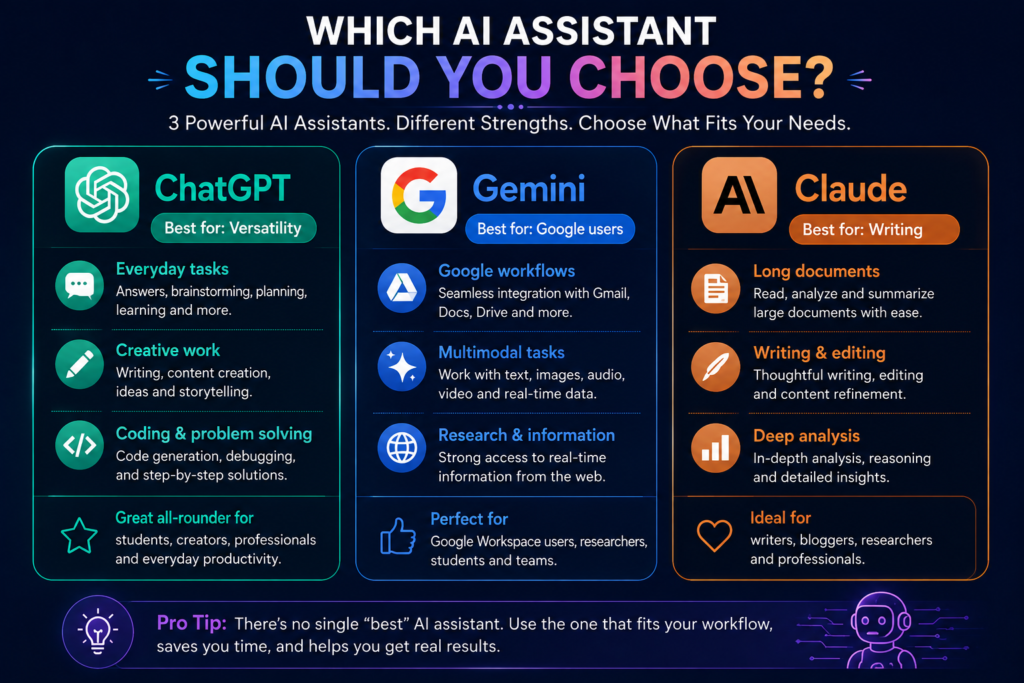
1. ChatGPT: Best All-Round AI Assistant
ChatGPT is one of the most versatile options for everyday AI use.
It can help with:
- Writing
- Brainstorming
- Learning
- Planning
- Coding
- File analysis
- Image analysis
- Web search
Its biggest strength is versatility.
You can move from:
“Help me write a blog outline”
to:
“Improve this introduction”
to:
“Turn this into a LinkedIn post”
—all within the same workflow.
OpenAI’s current free tier also includes capabilities such as web search, data analysis, file and image uploads, GPT discovery, and image creation, subject to usage limits. (OpenAI Help Center)
ChatGPT is best for:
- Beginners
- Content creators
- Students
- Marketers
- Everyday productivity
- People who want one flexible AI assistant
My verdict
Best overall for versatility.
2. Gemini: Best for Google Users
Gemini becomes especially useful if much of your digital life already revolves around Google’s ecosystem.
Its strengths include:
- Working with Google services
- Multimodal tasks
- Research
- Long-context work
- Everyday productivity
Google currently offers different AI plans with varying usage limits and context capacities. Its Gemini apps can work with text and other supported media, while higher tiers expand limits and context capacity. (Google Help)
Gemini is best for:
- Google Workspace users
- Android users
- Students
- Researchers
- People already working heavily with Google’s ecosystem
My verdict
Best for people already living in the Google ecosystem.
3. Claude: Best for Thoughtful Writing and Long-Form Work
Claude has developed a strong reputation among writers, researchers, and professionals who work with substantial amounts of text.
It can help with:
- Writing and editing
- Long documents
- Analysis
- Coding
- Web search
- Data visualization
Claude also offers Artifacts, which allow users to create standalone documents, code, diagrams, websites, and interactive content in a dedicated workspace. (Anthropic Help Center)
Its free plan includes core chat capabilities with limited usage, while paid plans offer higher capacity and additional features. (Anthropic Help Center)
Claude is best for:
- Writers
- Bloggers
- Researchers
- Long-form content
- Detailed document analysis
- Thoughtful editing
My verdict
Best for long-form writing and deep text-based work.
Which AI Assistant Is Best for Writing?
For writing, both ChatGPT and Claude are strong choices.
Choose ChatGPT if you want:
- Fast brainstorming
- Multiple content formats
- Social media ideas
- Flexible conversations
- A broad range of creative tasks
Choose Claude if you want:
- Long-form writing
- Editing
- Structured content
- Detailed analysis of text
- Working through larger documents
Winner: It depends on your workflow.
For bloggers, I would personally recommend trying both before committing to one.
Which AI Assistant Is Best for Research?
For research, current information matters.
ChatGPT can search the web and provide cited information when web search is used. Claude also supports web search, while its paid Research feature can conduct multi-step investigation across multiple sources. Gemini offers strong capabilities for working with information and large context, with access varying by plan. (OpenAI Help Center)
My recommendation:
- Quick, flexible research: ChatGPT
- Deep, multi-step research: Claude Research
- Google-connected workflows: Gemini
Regardless of the tool:
Always verify important statistics, sources, dates, and claims.
Which One Is Best for Beginners?
🥇 ChatGPT
If you are completely new to AI, ChatGPT is an excellent starting point because of its flexible conversational interface and wide range of use cases.
🥈 Gemini
A great choice for people already familiar with Google products.
🥉 Claude
Also beginner-friendly, but its biggest strengths become more apparent when you’re doing deeper writing, document work, and structured projects.
Free Plans: What Should You Know?
All three offer ways to get started without immediately paying.
However, this is important:
Free-plan limits and available features change frequently.
Currently:
- ChatGPT Free includes core chat plus access to selected tools, with usage limits. (OpenAI Help Center)
- Gemini offers standard access without a Google AI plan, with limits that depend on usage and feature complexity. (Google Help)
- Claude Free is available with limited usage for occasional use. (Anthropic Help Center)
My advice: Start free.
Don’t pay for an AI subscription until you know exactly how the tool fits into your workflow.
So, Which One Should You Choose?
Here’s the simplest answer.
Choose ChatGPT if you want:
One versatile AI assistant for almost everything.
Choose Gemini if you want:
An AI assistant that fits naturally into a Google-centered workflow.
Choose Claude if you want:
Strong support for writing, analysis, and long-form work.
My Recommendation for Beginners
You don’t actually have to choose only one.
Try this:
Use ChatGPT for:
- Brainstorming
- Content ideas
- Learning
- Everyday tasks
Use Gemini for:
- Google-centered workflows
- Research
- Multimodal tasks
Use Claude for:
- Blog writing
- Editing
- Long documents
- Detailed analysis
Then decide which one genuinely saves you the most time.
Final Verdict
🏆 Best Overall: ChatGPT
For versatility and everyday use.
🏆 Best for Google Users: Gemini
For people already working inside the Google ecosystem.
🏆 Best for Writing: Claude
For thoughtful writing, editing, and long-form work.
But remember:
The best AI assistant isn’t necessarily the one with the most features.
It’s the one that fits naturally into your workflow and helps you produce better results.
Start with the free versions.
Experiment.
Compare.
And build your own AI toolkit based on real needs—not hype.
Frequently Asked Questions
Is ChatGPT better than Gemini?
Not in every situation. ChatGPT is highly versatile, while Gemini can be particularly attractive for people who work heavily with Google’s ecosystem.
Is Claude better for writing?
Claude is a strong choice for writing and long-form text work, but ChatGPT can also be highly effective. The best option depends on your writing workflow and preferences.
Can I use all three AI assistants for free?
Yes, all three offer ways to get started without paying, although features and usage limits vary and can change over time. (OpenAI Help Center)
Which AI assistant should beginners use?
ChatGPT is an excellent general starting point, but beginners should experiment with all three free versions to see which interface and workflow they prefer.
Can AI assistants make mistakes?
Yes. All AI assistants can generate inaccurate or misleading information. Important information should always be verified.