

AI tools are everywhere in 2026.
But here’s the problem: more tools do not automatically mean more productivity.
The smartest approach is to choose AI based on the job you want to get done. Whether you write, research, design, code, create videos, or automate workflows, there is now an AI category built for that purpose.
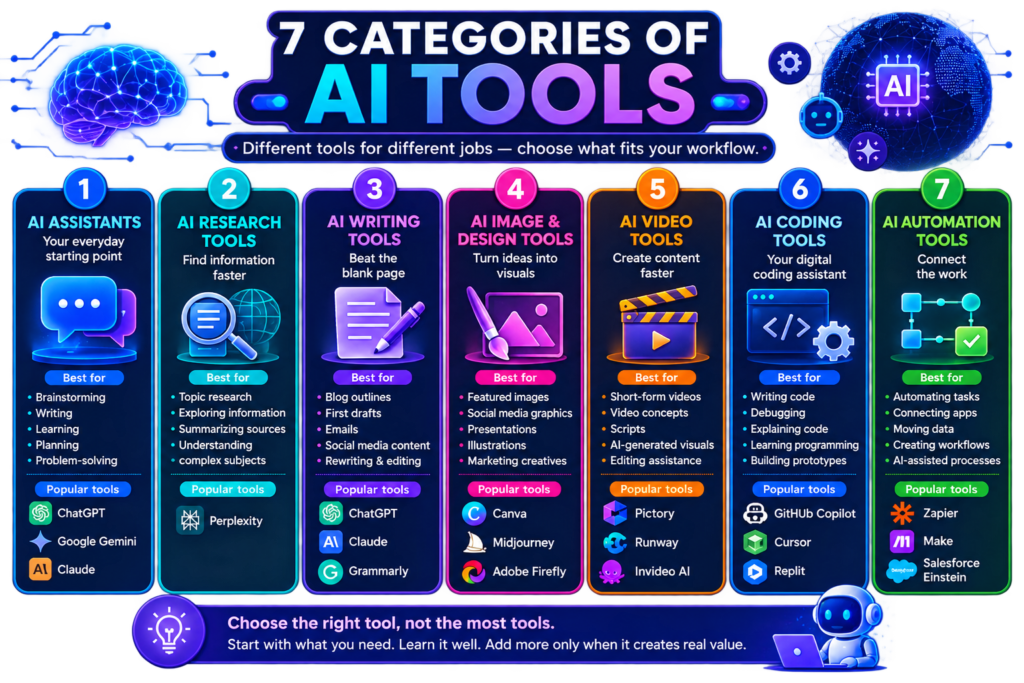
Here are the 7 most useful categories of AI tools and some popular options worth exploring.
1. AI Assistants: Your Everyday Starting Point
Best for:
- Brainstorming
- Writing
- Learning
- Planning
- Problem-solving
Popular options include ChatGPT, Claude, and Google Gemini.
These general-purpose assistants can help with a wide range of everyday tasks, from drafting content and summarizing information to reasoning through problems and analyzing files.
2. AI Research Tools: Find Information Faster
Best for:
- Topic research
- Exploring current information
- Summarizing sources
- Understanding complex subjects
A popular option is Perplexity.
Research-focused AI tools can help you discover information quickly, but AI-generated answers should never replace fact-checking. Always review important sources, statistics, and claims.
Best for: Students, bloggers, researchers, and marketers.
3. AI Writing Tools: Beat the Blank Page
Best for:
- Blog outlines
- First drafts
- Email writing
- Social media content
- Rewriting and editing
Tools such as ChatGPT and Claude can help generate and refine content. Claude officially supports writing, summarization, analysis, translation, and brainstorming tasks. (Anthropic Help Center)
Important: Use AI for the first draft—not the final brain.
Add your experience, opinions, examples, and fact-checking to make content genuinely valuable.
4. AI Image and Design Tools: Turn Ideas Into Visuals
Best for:
- Featured images
- Social media graphics
- Presentations
- Illustrations
- Marketing creatives
Canva is particularly useful for beginners because it combines AI-assisted creation with easy visual editing.
Best takeaway: AI can speed up design, but branding, readability, and visual hierarchy still require human judgment.
5. AI Video Tools: Create Content Faster
Best for:
- Short-form videos
- Video concepts
- Scripts
- AI-generated visuals
- Editing assistance
AI video tools are making video creation more accessible to creators and businesses that don’t have large production teams.
Best for: Content creators, marketers, and small businesses.
Tip: Start with AI for scripting and ideation before moving into more advanced AI video generation.
6. AI Coding Tools: Your Digital Coding Assistant
Best for:
- Writing code
- Debugging
- Explaining code
- Learning programming
- Building prototypes
Popular AI coding assistants include GitHub Copilot and AI-powered development environments.
These tools can be extremely useful—but generated code should always be reviewed and tested.
AI can write code. It cannot remove your responsibility for checking it.
7. AI Automation Tools: Connect the Work
Best for:
- Automating repetitive tasks
- Connecting apps
- Moving data between tools
- Creating workflows
- Building AI-assisted processes
Zapier, for example, supports AI-powered automation across connected apps and workflows. (Zapier Help)
A simple workflow could look like:
New Lead → AI Categorizes → CRM Updates → Follow-up Prepared
This is where AI is becoming particularly powerful—not just answering questions, but helping workflows move from one step to the next.
Quick Comparison: The 7 Categories
| AI Category | Best For |
|---|---|
| AI Assistants | Everyday tasks and problem-solving |
| Research Tools | Finding and understanding information |
| Writing Tools | Drafting and editing content |
| Image & Design Tools | Creating visuals |
| Video Tools | Video creation and editing |
| Coding Tools | Writing and understanding code |
| Automation Tools | Connecting and automating workflows |
How Do You Choose the Right AI Tool?
Don’t ask:
“What is the best AI tool?”
Ask:
“What task do I want to do better?”
For example:
- Need ideas? → AI Assistant
- Need research? → Research Tool
- Need a blog draft? → Writing Tool
- Need visuals? → Design Tool
- Need repetitive work automated? → Automation Tool
The best AI tool is the one that genuinely improves your workflow.
My Recommendation for Beginners
Don’t subscribe to 10 AI tools at once.
Start with:
- One general AI assistant
- One design or creative tool
- One specialized tool only when you actually need it
Learn those properly before adding more.
The biggest AI advantage in 2026 won’t come from using the most tools.
It will come from knowing which tool to use, when to use it, and when human judgment matters more.
Final Thoughts
AI tools are rapidly becoming part of everyday digital work.
From writing and research to design, coding, video, and automation, the possibilities are expanding quickly. But productivity doesn’t come from chasing every new AI launch.
Build your own AI toolkit around your real needs.
Start small. Solve real problems. Add tools only when they create genuine value.
FAQs
What is the best AI tool in 2026?
There is no single best AI tool for everyone. The right choice depends on whether you need help with writing, research, design, coding, video, or automation.
Which AI tools should beginners start with?
Start with one general-purpose AI assistant and one tool related to your main work or creative needs.
Are AI tools free?
Many AI tools offer free versions with usage limits, while advanced capabilities may require paid plans.
Can AI tools replace human workers?
AI can automate and assist with specific tasks, but human judgment, creativity, strategy, and accountability remain important.
How can I choose an AI tool?
Start with the problem you want to solve. Compare tools based on usefulness, accuracy, ease of use, privacy, and value for money.