
Walk into any laptop aisle — or scroll any laptop listing — in 2026, and you’ll be hit with the same wall of stickers: “Copilot+ PC”, “AI-powered”, “NPU inside”, “XX TOPS”. It sounds impressive. Most of it is genuinely useful. But almost none of it is explained in plain language.
Here’s the thing worth knowing upfront: an “AI laptop” today can mean anything from a laptop with a slightly newer chip to a full Copilot+ class machine built specifically for on-device AI. The label alone doesn’t tell you much — what matters is understanding the pieces underneath it, as laid out well in this breakdown from Laptop Outlet. Let’s decode it properly so you know exactly what you’re paying for.
First: What Is an NPU, Really?
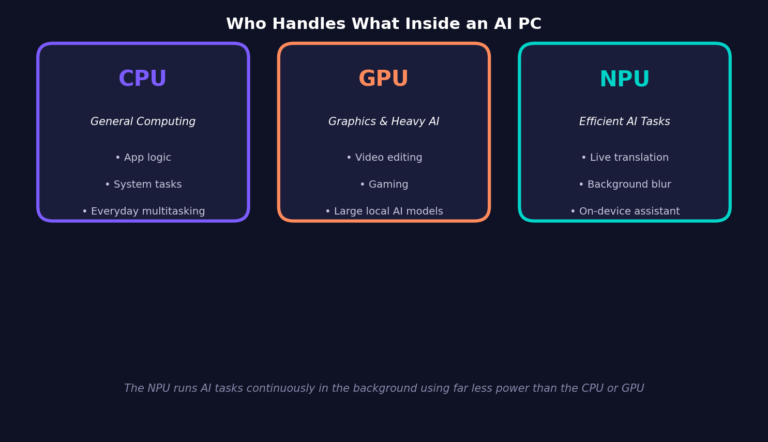
Your laptop already has a CPU (general computing) and a GPU (graphics and heavy compute). The “NPU — Neural Processing Unit” — is the newest addition: a dedicated chip built specifically to run AI tasks like voice recognition, live translation, and image generation directly on the device, instead of sending that work to the cloud, as Microsoft explains in its AI PC guide.
The reason this matters isn’t just speed — it’s efficiency and privacy. Running AI on the NPU instead of the cloud means your data stays on your device, and it uses dramatically less power than doing the same task on the CPU or GPU.
Next: What Does “TOPS” Actually Mean?
“TOPS” stands for Trillion Operations Per Second — it’s the metric chipmakers use to advertise how powerful an NPU is. But here’s the nuance most marketing pages skip: TOPS is a measure of raw computational throughput, not a direct measure of real-world AI quality, as one detailed chip comparison from AI Hardware points out. That said, a higher TOPS figure does generally translate to faster local processing for things like image generation, background noise removal, and on-device AI responses.
As a rough shopping guide, ASUS’s own buying advice suggests around 40–50 TOPS is enough for everyday tasks like video calls and productivity, while 70–80 TOPS is better suited to content creation, multitasking, and heavier AI workflows.
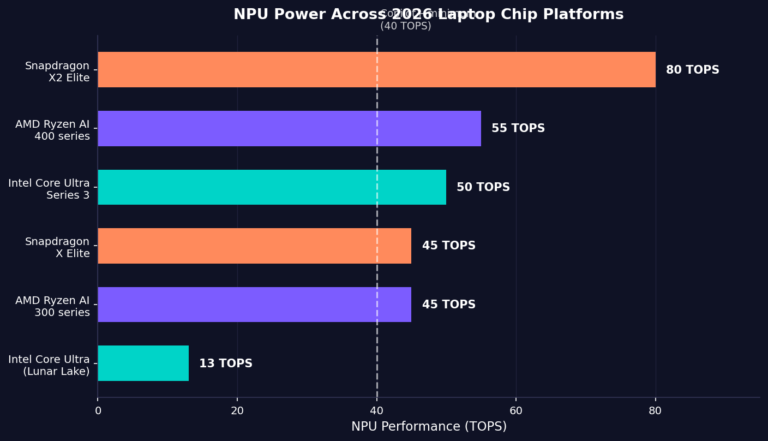
The gap between chip generations has moved fast this year. Early Intel Core Ultra (Lunar Lake) chips shipped with an NPU in the 11–15 TOPS range, according to AI Hardware’s testing breakdown — well under the Copilot+ threshold. By contrast, Qualcomm’s newer Snapdragon X2 Elite launched in 2026 with an NPU rated at roughly 80 TOPS, nearly double its predecessor, as reported by The Gadgeteer. Intel and AMD have both closed the gap since with their newer Core Ultra Series 3 and Ryzen AI 400 chips.
What Is a “Copilot+ PC”
This is the one term with an actual technical definition, not just marketing. According to Microsoft, a Copilot+ PC requires an NPU capable of at least 40 TOPS — that’s the literal hardware bar a laptop has to clear to unlock features like Recall, live captions and translation, and Cocreator image generation.
So: every Copilot+ PC is an AI PC, but not every AI PC is a Copilot+ PC. If a laptop’s NPU sits under 40 TOPS, it can still handle basic AI features — it just won’t carry the Copilot+ badge or unlock Microsoft’s full on-device feature set.
The Three-Way Chip Battle: Intel vs AMD vs Qualcomm
You’ll typically be choosing between three chip families, and each leans into a different strength:
– Intel Core Ultra — Best for guaranteed app compatibility and established Windows workflows; a safe pick for anyone running legacy business software, according to HP’s comparison guide.
– AMD Ryzen AI — Known for strong integrated graphics and balanced multi-core performance, making it a solid pick for light gaming and creative work without a dedicated GPU, per TiraTech’s breakdown.
– Snapdragon X (Elite/X2) — Built on ARM architecture, prioritizing battery life above all else, with HP citing typical use of “20–34 hours” on a single charge — far ahead of the 12–16 hours typical of Intel or AMD machines. The trade-off is occasional app compatibility friction with software that isn’t built natively for ARM.
So — What Actually Matters When You’re Buying?
Strip away the marketing and the buying decision comes down to a short checklist:
1. Match the TOPS to your actual use, not the sticker. 40 TOPS covers everyday productivity, go higher only if you’re doing heavy content creation or local AI work.
2. Decide if you even need Copilot+ features. If you don’t care about Recall or on-device image generation, don’t pay extra just for the badge.
3. Pick the chip family based on your software, not the NPU number.If you rely on specific Windows business software, compatibility matters more than raw TOPS.
4. Battery life still comes from the whole platform, not just the NPU. ARM-based Snapdragon chips generally win here by a wide margin.
5. The basics still come first. As one buying guide bluntly puts it, the NPU spec sheet isn’t a reason by itself to spend real money — a laptop still needs to be right on screen quality, RAM, storage, and price before the AI badge should tip the decision, a point made clearly by The Gadgeteer.
The Bottom Line
“AI PC” has gone from a niche marketing term to the default way laptops are sold in 2026 — but the underlying hardware differences are real and worth understanding before you spend. NPU tells you *whether* a laptop can run AI tasks locally, TOPS tells you *how fast*, and Copilot+ tells you whether it clears Microsoft’s specific bar for its full feature set. None of those three numbers should replace the basics: screen, memory, storage, and how well it runs the software you actually use every day.